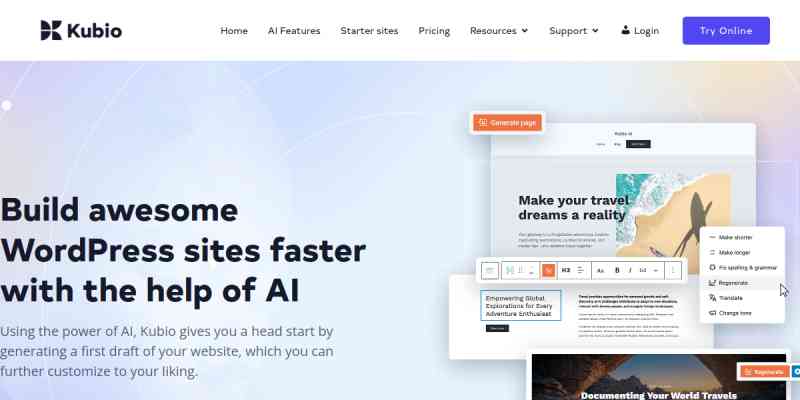
Using the power of AI, Kubio gives you a head start by generating a first draft of your website, which you can further customize to your liking.
BUILD AWESOME WORDPRESS SITES FASTER WITH THE HELP OF AI
Experience the potential of Kubio AI, where your creative visions are seamlessly translated into captivating web pages.
With its intelligent block-based builder, cutting-edge AI technology empowers you to effortlessly shape layouts, customize styles, and infuse life into every pixel.
- Generate entire pages based on short prompts
- Generate images and text
- Re-generate any section in your style
CREATE RICH WEBSITES WITH THE KUBIO BLOCKS
Kubio is an innovative block-based WordPress website builder that enriches the block editor with new blocks and gives its users endless styling options. With the help of advanced editing capabilities, Kubio users can build websites fast, with ease, and no code.
Each block was designed with regard to ease of use, simplicity, and UX-friendliness. Web design with Kubio is intuitive so that Kubio users can experience a hassle-free experience.
The winning Kubio formula allows you to create the website you envision by adding blocks and pre-designed sections to ready-made starter sites or a blank canvas. Blocks and sections are fully customizable and mobile responsive.
The Kubio blocks are structured as seen below:
Basic blocks
- Image – Add images that you can customize any way you see fit to your web pages. Beautify your images using frames, borders, and shadows.
- Link Group – Add multiple stylish links to your content. Adjust them while in a normal or hovered state.
- Paragraph – Add text that can be stylized your way: from font family, font weight, and size, to color, borders, and shadows.
- Video – Add self-hosted, Youtube, or Vimeo videos. Adjust their background, spacing, aspect ratios, and shadows.
- Spacer – You can use the spacer block instead of margins and paddings when you want to add space between various content sections.
- Columns – Add columns to the website canvas, then add blocks to them. Make adjustments to each column’s spacing, typography, background, and more.
- Buttons – Create enticing calls to action. Fine-tune them until you get the right typography, colors, and spacing.
- Heading – Create headings that stand out using highlighted words. Customize their typography, color, shadow, borders, and background.
- Icon – Make use of icons to better reinforce your website messaging. 100+ free icons are available from the most popular libraries out there.
- Divider – Use dividers to separate website sections in a creative way. Customize their color, line thickness, and more.
Advanced blocks
- Image Gallery – Create appealing image galleries and customize their number of columns, image size, click behavior, and more.
- Shortcode – Use shortcodes to insert various forms, galleries, tables, and more, depending on the plugins you use.
- Posts List – Add your most recent or popular blog posts to any web page.
- Social Icons – Make your social media profiles stand out across your website. From Instagram to Snapchat and Youtube, you can add any icon you need and style it to match your brand.
- Contact form – Add a contact form to any page and customize its header, fields, and call to action with ease.
- Icon list – Create stylish lists of items and their icons. Customize their spacing, borders, shadows, color, and typography.
- Dropdown Menu – Add your main web pages and products to a stylish dropdown menu with this Gutenberg block.
- Accordion Menu – Add your main web pages to a stylish accordion menu that will help your visitors find the content they need.
Site-related blocks
- Copyright – Add a stylish copyright notice to your website whenever it becomes available to the public.
- Search – Make it easy for your website visitors to find content on your site and navigate seamlessly.
- Logo – Make sure your visual identity is clear to your website visitors by adding your logo in a visible place.
- Page title – The site title block allows you to name your site. You can use your brand, business name, or your own name.
- Home Button – Improve your website navigation by making it easy for your users to go back to your homepage. Place the home button on all of your pages.
Blog blocks
- Widget area – The widget area block allows you to add blog widgets anywhere you want on a page or post.
- Pagination – Use buttons only or buttons with numbers pagination to help your website visitors navigate your blog.
- Pagination Nav Button – Adjust your blog pagination with nice buttons that will help your visitors navigate through the blog.
- Pagination numbers – Use numbers for your blog pagination to help your blog visitors discover the content they need easily.
- Blog layout – Use this blog to easily set the layout of your blog pages.
- Post title – Create beautiful post titles. Customize their typography, color, shadow, borders, and background.
- Post summary – Display a short and catchy summary of your blog article to serve as a preview in your blog listing.
- Post featured image – Add a relevant and catchy image to every blog article. Adjust its size, borders, shadow, and more.
- Post tags – Add relevant tags to every blog article. This way you will group them under the same index.
- Post categories – Use blog post categories in order to group articles under certain topics.
- Post metadata – Add details to your blog articles such as author, publishing date, and comments, to help them rank faster in organic results.
- Post comments – Customize your comments section, from typography and color to authors and replies.
- Post comment form – If you allow blog comments, you’ll need to do this via a comment form. Customize your comments form fields, labels, buttons, links, backgrounds, and more.
- Read more button – Add a catchy “Read more” call to action to your blog articles on the blog listing page.
- Author avatar – Display the post or page author avatar image.
- Author name – Display the post or page author name.
- Author bio – Display the post or page author biography.
Kubio template parts blocks
Because Kubio allows full-site editing, you can create various headers, footers, and sidebars, and edit them inside any page or as templates.
KEY KUBIO FEATURES
- Full-site editing. When using the Kubio builder – Elevate WordPress theme combo, you can unleash the full potential of full-site editing.
- Custom headers and footers – With Kubio you can create custom headers and footers that are fully customizable inside the Kubio Editor.
- Blocks drag and drop. You can drag and drop blocks wherever you see fit.
- 10 free fully customizable starter sites and more in PRO. Pick a ready-made design and insert your own visuals and text, and you’re ready to roll.
- Designer-made sections. Choose from a variety of website sections to design all that you need: from portfolio to team and features sections.
- Blocks and sections are responsive out-of-the-box.
- Advanced block editing. From font family to background colors, spacing, and borders, anything can be customized with Kubio.
- Color, background, borders, shadows controls – you can style literally anything.
- Font size: em, rem, px. Scale font sizes using em and rem options so that you can be consistent across your whole site.
- Redo Undo. Need to go back and fix an error? No worries. With Redo and Undo you can go back and forth.
- Control over global colors. There are multiple global color schemes available to choose from, that can help you be consistent across all pages.
- Control over global typography. From the size and font family to shadows, alignment, and more, you have full control over your website typography.
- Navigate between pages and posts without exiting to the WordPress dashboard.
- Compatibility with other WordPress themes – Kubio works with any WordPress theme. It enhances the core WordPress editor and helps you transition to full site editing (FSE).
KUBIO PRO FEATURES INCLUDE
- 170+ predesigned sections
- 25+ front header designs
- Per page header customization
- Per page footer customization
- Sticky navigation
- Copy-paste styles across blocks and sections
- Import Adobe TypeKit fonts
- Video and slideshow backgrounds
- Background overlay
- Parallax effect
- Image effects
- 9 icons libraries
Blocks available with the PRO version
- Map – Embed Google Maps, insert your desired address, and adjust zoom, height, and hover behavior.
- Tabs – Make use of tabs to improve navigation and user experience. Style your tabs in the normal, hover, and active state.
- Accordion – Display creative collapsible texts in a dropdown manner. Stylize them according to your vision.
- Breadcrumb – Use this block to improve website navigation and to give users an overview of where they are on your site.
- Image Collage – Create visually appealing image collages using frames, overlays, shadows, borders, and other styling options.
- Flip box – Add flip effects to various elements on your website. Make edits to effect duration and direction.
- Counter – Show off various stats on your website using an animated Counter block for Gutenberg.
- Slider – Showcase testimonials, images, projects, and more, using sliders. Customize their transitions, arrows or dots, and everything in between.
- Carousel – Display images, videos, testimonials, products, and their features in beautifully displayed carousels.
- Pricing table – The pricing table block allows you to show prices in a visually appealing way. Whether you are selling a SaaS product, event tickets, or just want to display pricing tiers, this block is what you need. Besides the actual prices, you can provide other useful product details, such as features, benefits, and more.
- Pricing – Showcase the pricing of your products and services, and make your offers stand out in a stylish matter.
- Subscribe form – Insert beautiful and engaging contact forms via shortcode.
Documentation
You’ll find a growing online documentation for Kubio builder here. You can kick-off with Kubio while reading:
- The Kubio interface
- The structure of a webpage in Kubio: sections, columns, and blocks
- How to work with blocks
- Youtube